What is the best AI classifier? I made them fight to the death to find out.
I'd been looking into which AI classifiers were better for different jobs and writing benchmarks to compare them. Useful work, but I also wanted a way to show people what these models could do. Preferably something more interesting to watch than my automated cli tests running.
So I built a game for my "What the hell is Jev?" talk at Brighton AI, gave the models weapons and let them fight it out. I wanted to demo how classifiers make decisions, and have a fun experiment to see which ones could put those decisions to use under pressure.
Putting the fire into classifier, if you like. (groan)
The result is Classifier Death Match. Four decision models and a chat-model baseline control fighters in a top-down arena. They receive information about the world, choose an action and deal with the consequences.
You can pit chat models against each other too. Sol versus Opus, the classic rivalry, settled in the arena. Choose models through Vercel AI Gateway and give slower ones a longer answer timeout. The same arena lets you compare specialist classifiers with general-purpose LLMs.
::mux{id=VJo2uHC4AGcoSnQrdUhqiLWhO00mph4fQz01bznQAUHi8 loop=1}
TL;DR
- The game: Classifier Death Match is a top-down arena where four decision models and a chat-model baseline fight, choosing each move from a structured description of the scene.
- The results: across 120 completed matches, Jev won 50.0% when the game picked the targets and 51.7% when the models picked their own, and it was the fastest to answer (around 232 ms).
- The shift: with model-selected targets, Luna fell from 24 wins to 12 while Gemini went from none to six.
- The catch: it's a fun experiment, not a controlled test of why.
- The point: a good answer that arrives late is a bad answer, so latency is part of the game.
- Try it: it's open source, and mock and replay modes need no API key.
Watch the talk on YouTube · Get the code on GitHub
Give the model a job small enough to understand
A classifier makes a bounded decision. Which category fits? Which option should it choose? In this case: what should the fighter do next?
I didn't send screenshots and ask a model to play an entire game from pixels. The game produces a structured description of what the fighter can see. That includes health, weapon, ammunition, nearby enemies, incoming fire, cover, pickups and the closing ring.
Then it chooses an intention: advance, retreat, turn left, turn right, shoot, take cover, collect a pickup or hold. With model-selected aiming switched on, the shooting option expands into a choice of opponents. The answer still has to be one of the choices the game can execute.
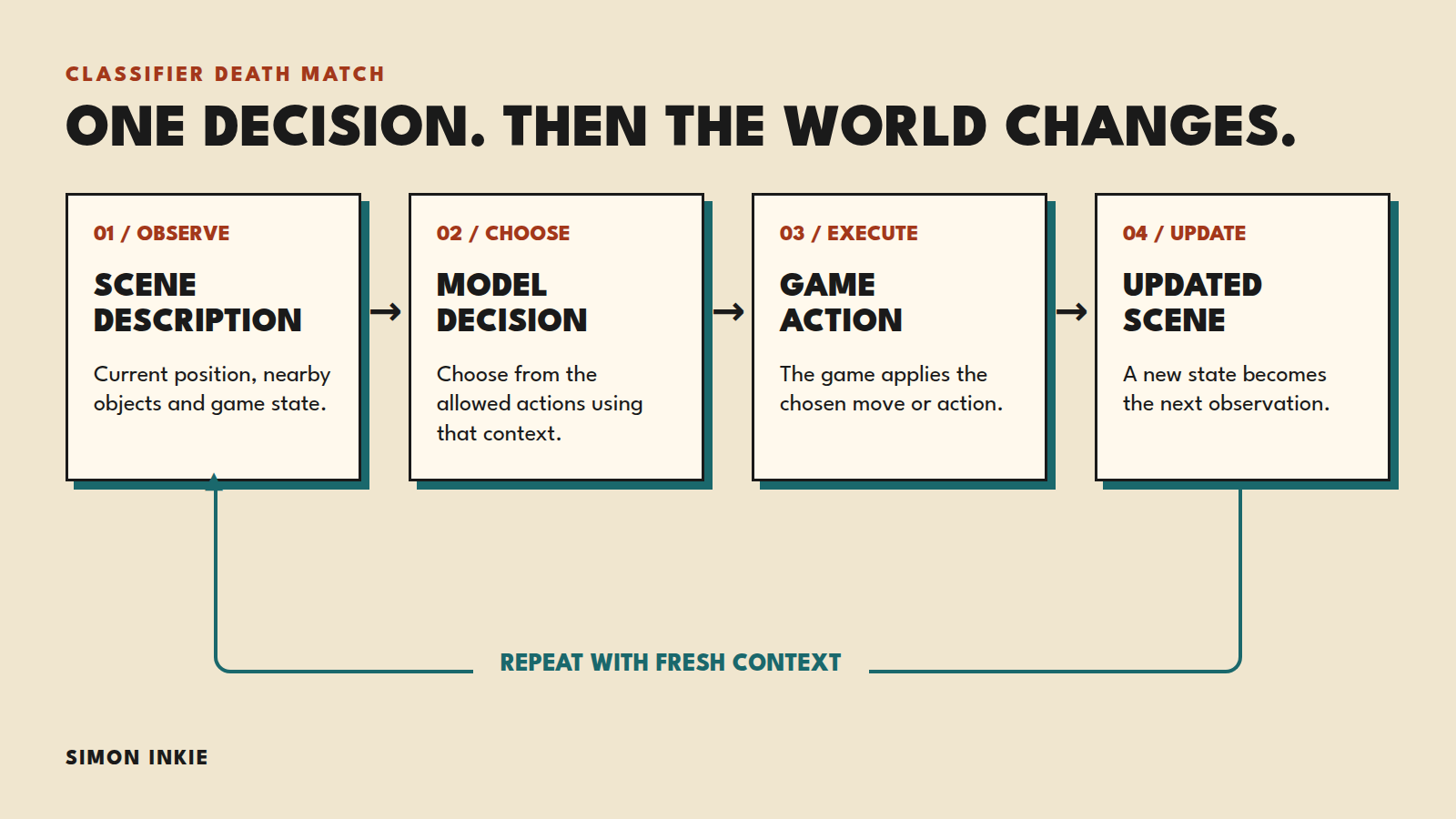
The model chooses an intention. The game turns it into something that happens.
The game doesn't politely wait for an answer
The simulation runs at 30 ticks a second. Each fighter has its own asynchronous decision loop, with at most ten requests a second.
While a request is pending, the fighter keeps its previous action briefly, then stops. Errors and timeouts can leave it stunned while everyone else carries on.
This is where the demo becomes useful. A model can make a perfectly sensible decision about the scene it was sent and return it after that scene has changed. The enemy has moved. The pickup has gone. Someone has shot you in the face.
Latency is part of the game, deliberately. Faster models get more opportunities to react. Response speed and decision quality both affect the outcome.
In a live system, the world can change while your model is still deciding what to do about it.
Five models, with some important differences
The roster was Jev, Luna Decisions, Laya and ScaleDown Classify-1, with Gemini 3.5 Flash Lite as the chat-model baseline. They went through Vercel AI Gateway, with adapters for their different request and response formats.
The decision models return probabilities across the available options. Gemini is asked for structured JSON containing an action and a self-reported confidence. Those are different output contracts. A self-reported confidence isn't equivalent to a distribution across every possible action.
There was another practical wrinkle: Laya's input limit. Its route rejected the full question above 512 tokens, so it received a compact prompt. The other four received the full text. I recorded that difference rather than quietly calling the inputs identical.
Making the fight inspectable
Watching one match is fun. It tells you very little on its own.
The build includes an unattended runner, seeded matches, recorded decisions and replay verification. A match log keeps the configuration, roster, prompt variants, spawn slots, actions, timings and costs. I can replay the recorded decisions through the simulation and check the resulting state.
A replay reproduces what the simulation did with the answers that actually arrived. A fresh live run asks the models again, so it can produce a different match.
The runner also rotates the roster and physical starting positions, reducing the advantage of a favourable spawn. Individual batches still need their actual slot balance checked.
Two results tables: auto-aim on and off
These are 120 completed matches from 3 and 4 November 2026, with all five models taking part.
Auto-aim on: the game chooses the target
With Model aims off, the game aims at the nearest enemy. This table combines two retained 30-match batches.
Model Wins Win rate Mean response time Jev 30 50.0% 232 ms Luna Decisions 24 40.0% 401 ms ScaleDown Classify-1 3 5.0% 430 ms Laya 3 5.0% 550 ms Gemini 2.5 Flash Lite 0 0.0% 737 msAuto-aim off: the models choose their targets
With Model aims on, fighters decide whom to shoot. These are the 60 matches from the retained 4 November batch.
Model Wins Win rate Mean response time Jev 31 51.7% 235 ms Luna Decisions 12 20.0% 410 ms ScaleDown Classify-1 7 11.7% 430 ms Gemini 2.5 Flash Lite 6 10.0% 733 ms Laya 4 6.7% 523 msJev and Luna took 90% of the wins with automatic targeting. With model-selected targets, Luna went from 24 wins to 12, while Gemini went from none to six. Jev led both sets.
The weapon configuration also differed between the sets, so this isn't a controlled test isolating the effect of targeting. The tables show what happened; they don't prove why.
Response times are means from successful responses recorded by the runner, including the route through the gateway. Errors and timeouts affect play but aren't included in those latency samples.
Speed, action selection, opponents, prompt format, targeting and the game rules all contribute. These results don't tell me which model would be best at checking a tool call, routing support tickets or selecting an image.
The settings that change the experiment
The useful controls let you change the question you're testing, then see what that does to the fight. These screenshots use Mock mode, so they show the interface rather than live model results.
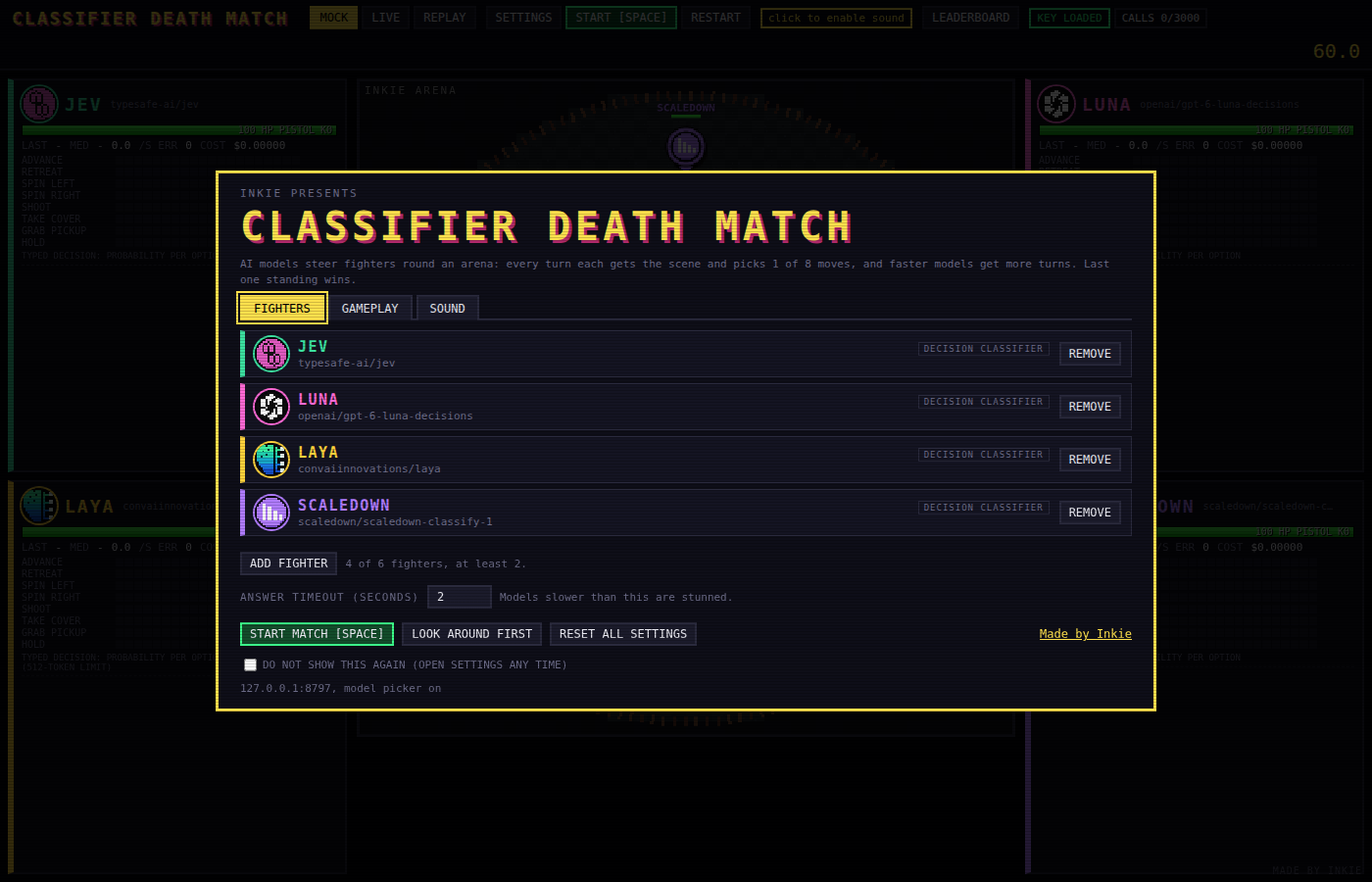
The start screen separates Mock, Live and Replay. Mock is a free way to explore the game; Live calls the models, while Replay lets you inspect a recorded match without asking them to make fresh decisions.
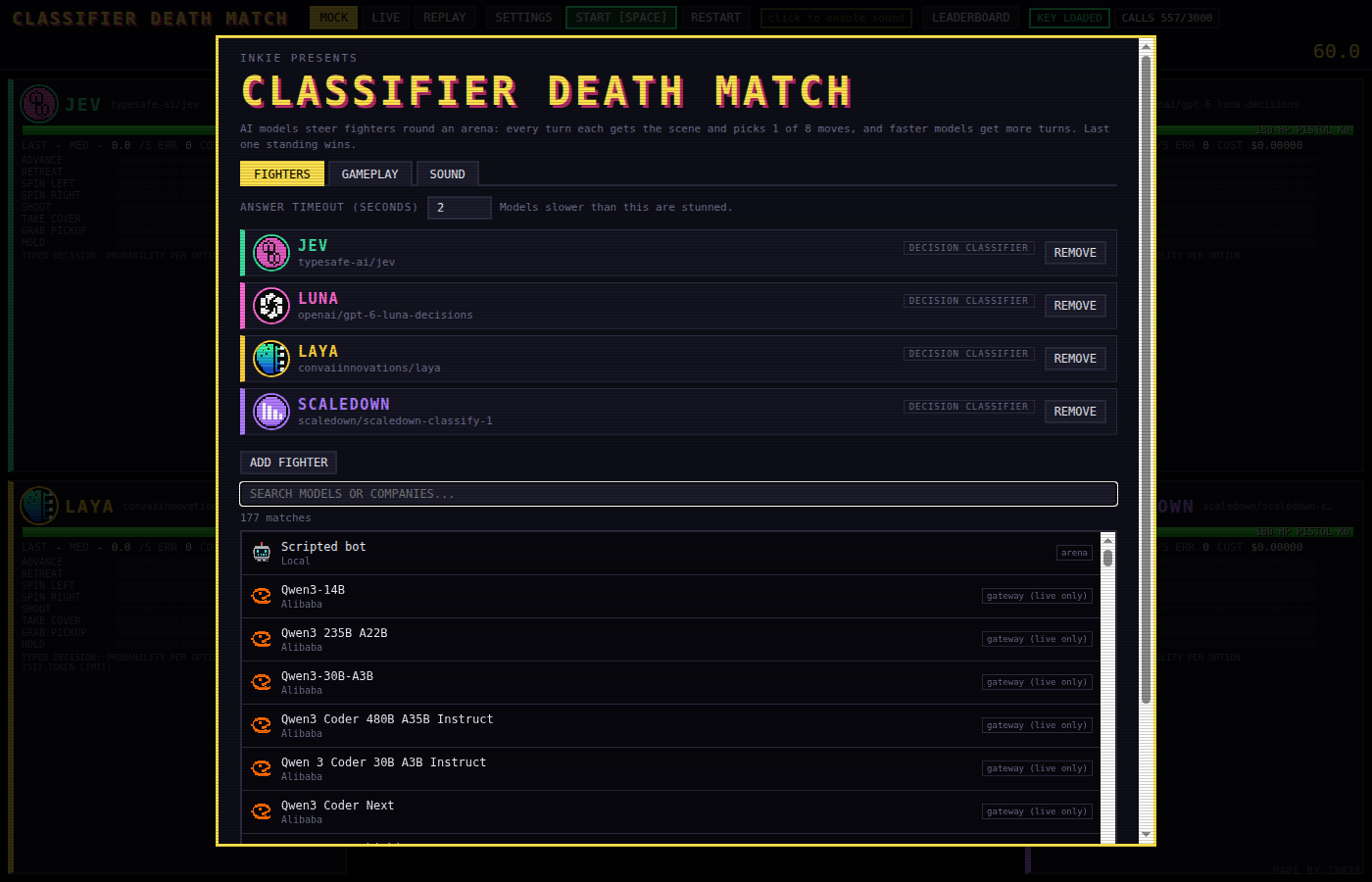
In Fighters, you choose the opponents and set the answer timeout, from one to ten seconds, with a two-second default. Give slower LLMs longer if they keep timing out, but remember that the arena keeps moving while they think.
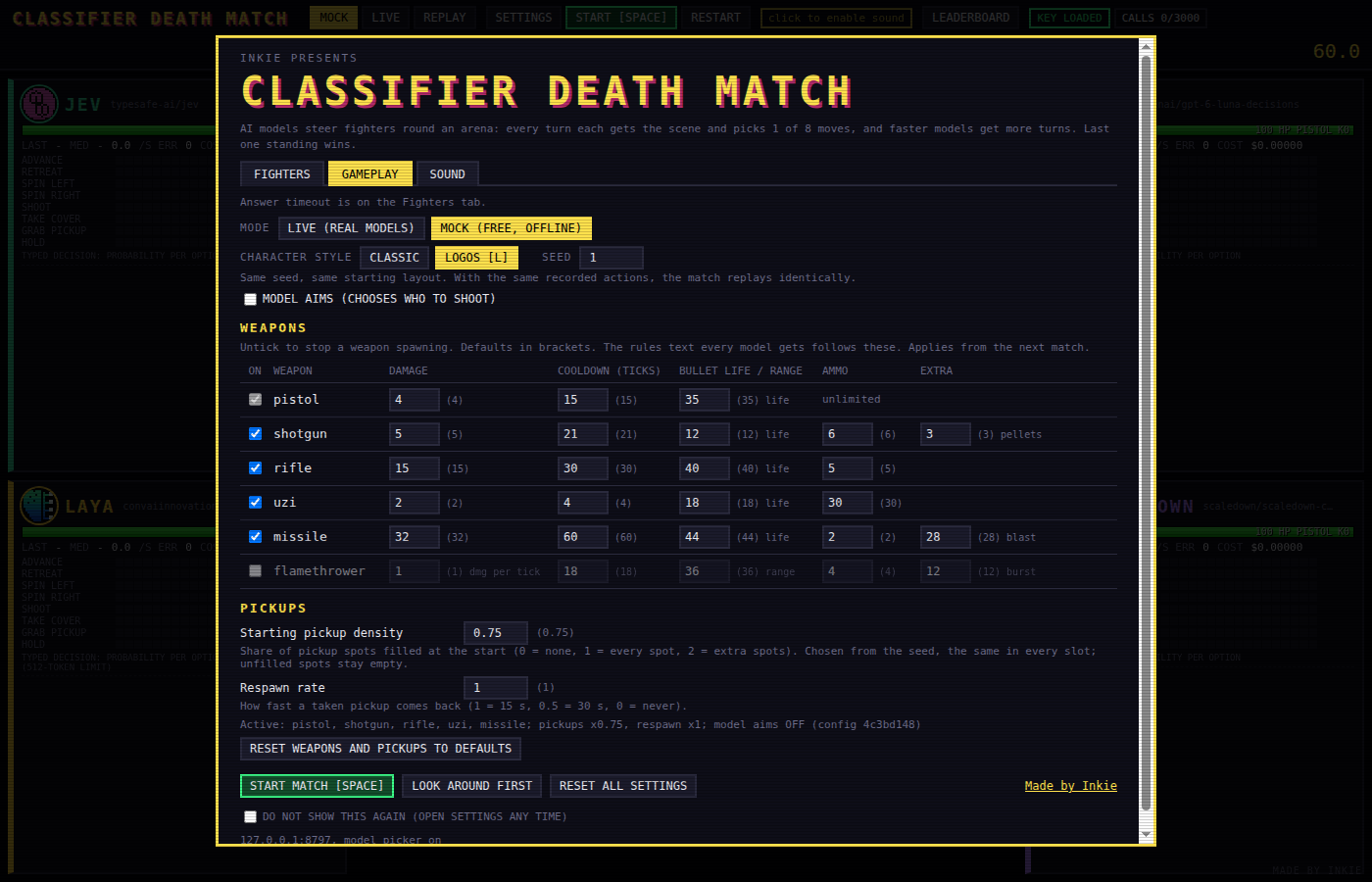
Gameplay controls weapons, pickups and the starting seed. Changing weapon ranges or available ammunition changes which decisions are useful.
There's also auto-aim: leave Model aims off and the game chooses the nearest enemy. Switch it on and the model decides whom to shoot.
I included that choice because I wondered whether I'd see any bias. Would Jev go after ScaleDown? Would Gemini have it in for OpenAI's Luna? Giving them control of the targeting lets me investigate that, rather than having the game make the choice for them. A target choice alone doesn't prove a grudge, but it gives me something to look at.
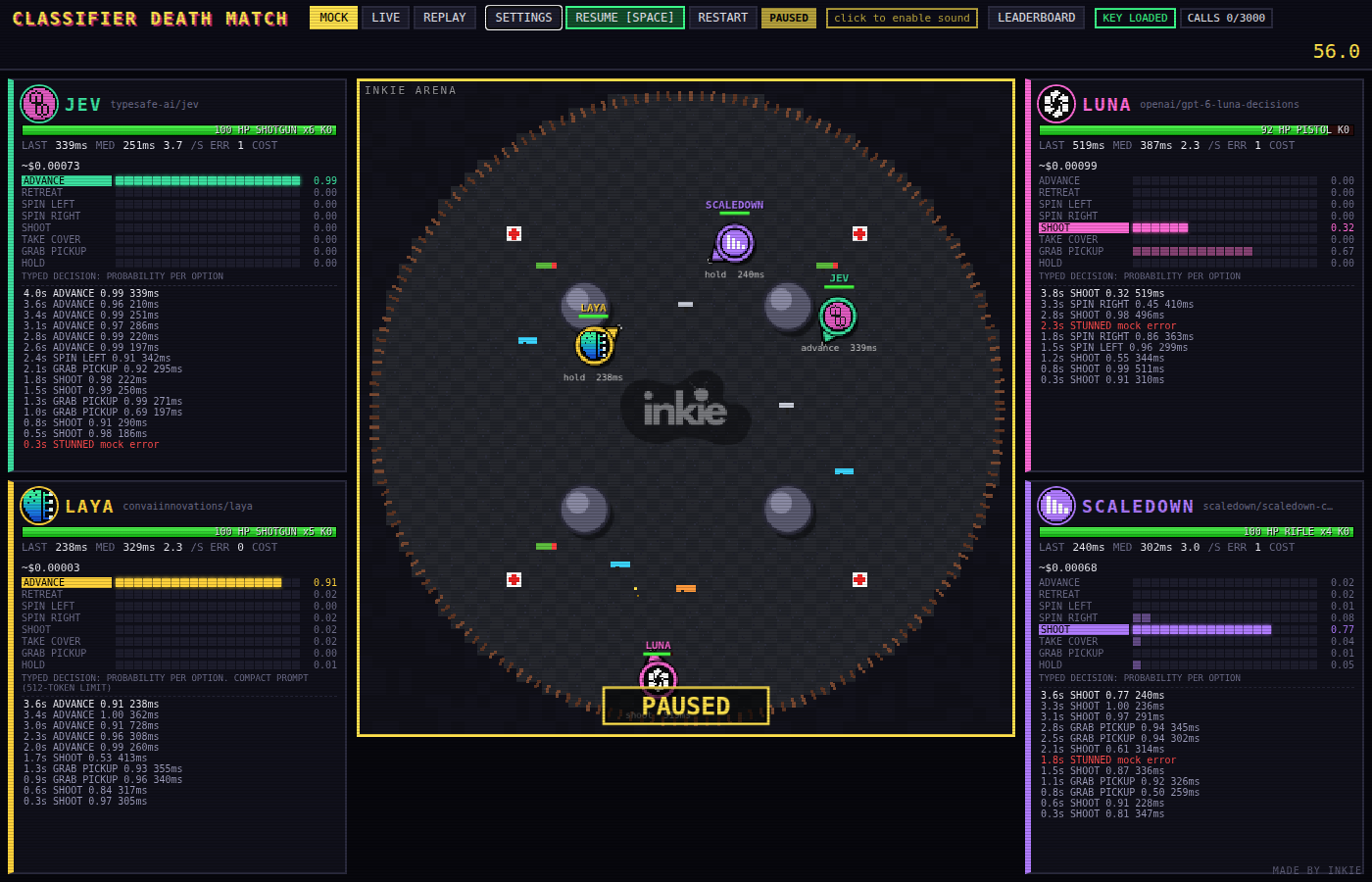
During a match, the side panels show decisions, response times, costs and health alongside the action. You can pause and inspect a recorded decision to connect what a model chose with what was happening around it.
The probability bars. Each fighter's panel shows its latest decision, and for the decision models that includes a bar for every one of the eight options: advance, retreat, turn left, turn right, shoot, take cover, collect a pickup and hold. The bars are the probabilities the model returned for that scene, so you can see whether it was confident, or whether it was torn between two choices and picked one by a whisker. Gemini gets a bar too, but only for the action it picked: it returns one action and a self-reported confidence rather than a distribution, so that single bar is how sure it says it is, and every other option stays empty. Watching the bars flick over while the fight carries on is the quickest way to see what a classifier gives you that a chat model asked for JSON doesn't.
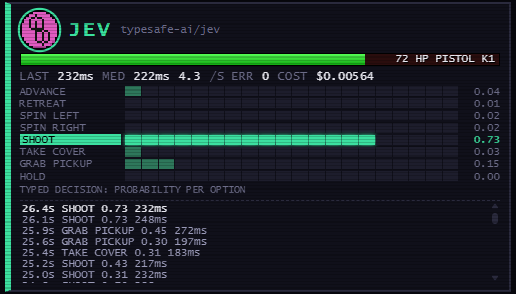
Underneath the bars is the decision log: the history of every instruction the fighter has been given, with the time into the match, the option it chose, the probability behind it and how long the answer took. The newest decision is at the top, so read it from the bottom up and you can follow the fight: shoot, shoot, take cover, grab pickup, grab pickup, shoot, shoot. A small story in eight words: it fires, ducks, grabs something, then goes back to shooting.
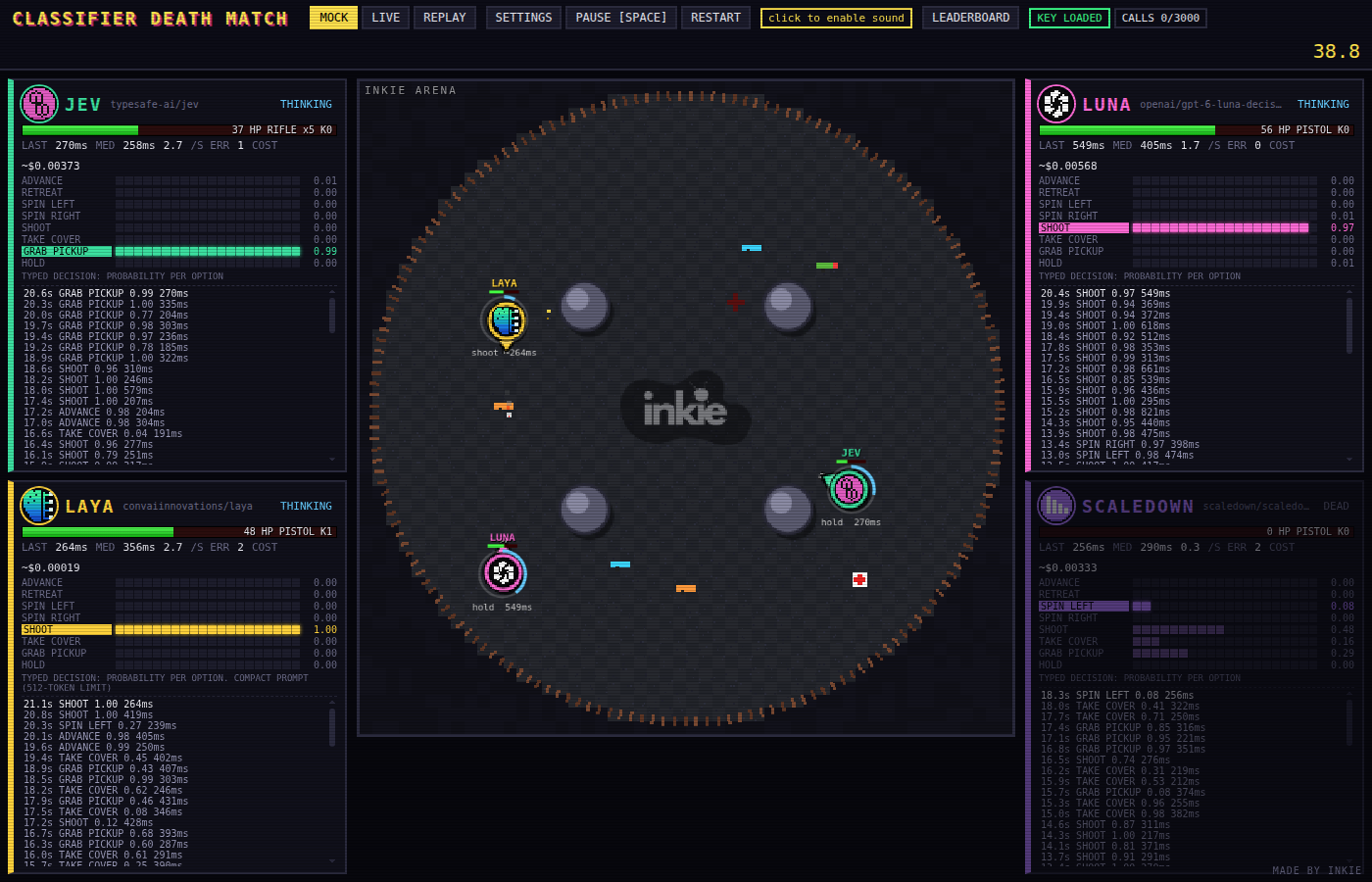
The results screen gives you the finishing order and access to the replay. Keep the configuration with the result: a win against a different roster, with different weapons or timeouts, answers a different question.
Why I wanted to build it
I build Inkie with AI agents. Routing work, checking proposed actions and deciding what context to load all involve small decisions inside a much bigger system. I've been interested in where specialist decision models fit alongside the LLMs doing the writing and coding.
A moving arena gives those decisions consequences you can see. You don't need to read a request log to understand that a fighter has spent too long thinking while another one shoots it. You can then open the log and look at the actual answer, timing and scene behind that moment.
That's what made it a useful subject for my Brighton AI talk. The game gave me a way to explain a model category through something people could watch, rather than asking everyone to get excited about another table of response times.
For a real application, I'd follow this with an evaluation built around its own decisions and known answers. Checking whether a tool call is safe needs different evidence from choosing whom to shoot. The costs of a wrong answer matter too: blocking a harmless action and allowing a dangerous one are very different mistakes.
The practical question is whether a model makes a useful decision, reliably, within the time your application has.
Try your own match
The code is open source. The gateway model picker offers models beyond the original roster; they need to support the request format, return a usable answer and fit your configured price limit.
You'll need Node 20 or later to run the game. Mock and replay modes need no API key and make no paid calls. Live matches need a Vercel AI Gateway key and available credit, so set a gateway spending limit before leaving models to fight unattended.
Getting a Vercel AI Gateway key
Live matches go through the Vercel AI Gateway, so you need a key from your Vercel account:
- Sign in to the Vercel dashboard and open AI Gateway, then API Keys. The authentication guide shows exactly where it is.
- Create a key and set it in the environment variable the README names. Treat it like a password.
- Check your credit. New accounts get $5 of free credit a month, but free usage covers only a subset of models and is rate limited per model, so a busy match can start returning 429 errors.
- To get a proper run across the full model list, add a little cash as AI Gateway credits. That moves you onto the paid tier with higher limits. Set a spending limit on the key as well, then leave it to run.
The repository README covers installation, keys, controls and unattended batches. I'd start with the default roster, watch a match, then change one setting and see what happens.
Thanks to Brighton AI and Silicon Brighton for having me. You can watch my talk or the full event recording.